CueCam Play (Web) - Open Beta
One of the best features of CueCam, in our opinion, is that you don't need any special software to collaborate. Anyone can view the files CueCam creates because they are just simple video files with 'burned-in' information that you can easily scrub through.
Well, that's always going to be true, but anything that makes navigating these files easier is a good thing. So we built CueCam Play and, now CueCam Play Web.
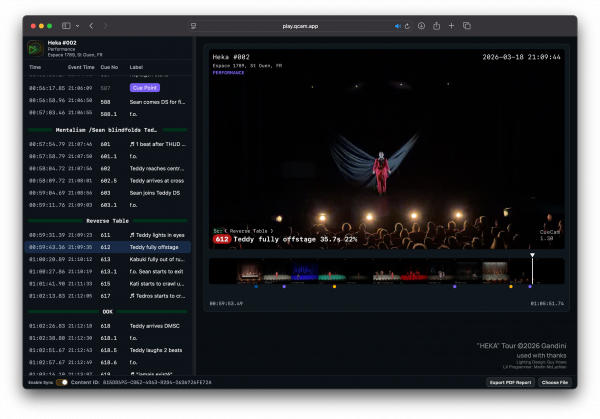
CueCam Play Web requires no downloads, and runs in your web browser. Your video files never leave your own computer.
Simply drag and drop any* CueCam video with onto CueCam Play and see all your cues and markers in a list view.
CueCam files contain hidden metadata to enable this functionality, however AirDrop and other transmission methods can cause this to be stripped. See this page on metadata for more information.
Navigation
- Click on any marker or cue to jump direct to that point in the video
- You can also navigate using the timeline beneath the video
- Navigate the list with the up/down arrow keys
- Shift + Arrow Keys - Previous/Next Marker
- Cmd + Arrow Keys - Previous/Next Scene
PDF Report
Need a quick printed or shareable copy of the markers you've placed?
You can export a PDF containing a list of all the cues with note Markers, the exact timing of the note (and whether it happened whilst the cue was running or after it completed, and a summary of every cue a marker is placed in - handy for reviewing those post-rehearsal live moves or timing notes.
Live Collaboration and Sync
Working with someone else? Send them your CueCam recording and turn on Sync using the switch at the bottom of the window. As long as you both have the same CueCam file open, selecting any marker will jump the playhead on all connected viewers at once.
Again, your own show data doesn't leave your computer, and we don't host your videos. You'll need to provide the other party with the CueCam video file directly or perhaps use the built-in Dropbox integration.