Table of Contents
EOS Integration
Eos 3.3.9 onwards introduces considerable improvements to OSC, and the additional configuration below will not be required as of CueCam 2.0.1 if you are using Eos 3.3.9
CueCam is designed exclusively to work with the ETC Eos lighting consoles (including ETCnomad). It has been tested with the ETC Element and ETC Eos range of consoles as well as ETCnomad software on both Mac and Windows.
It uses standard OSC commands that are officially supported by ETC, and well documented, so should work with any version of ETC Eos that supports them over TCP SLIP 1.1
Eos supports different forms of OSC;
- Third-Party OSC (Eos 3.3.9 on) - CueCam can now use this for both cue information and OSC commands, meaning that with the latest versions of Eos manual port selection is not required.
- Third-Party OSC (TCP Port 3037) - CueCam uses this for the main cue information, you cannot change the port. Note that Eos currently does not send messages from Magic Sheets or Macros using
Send_Stringover Third-Party OSC, which is why an additional port is required. - TCP SLIP 1.1 OSC - CueCam uses this to provide remote control and features like Markers via OSC Commands. This must be configured in Eos Show Control on a port of your choice, and the same port entered into CueCam
- UDP OSC - CueCam cannot use UDP OSC for cue information, but it can be used to receive OSC Commands although this is really intended for using devices other than the Eos console. For Eos, we recommend using SLIP 1.1 as above.
Configuring Eos
OSC Configuration
To get the most from CueCam you need to enable two different options in ETC Eos
Within Settings > Device > Network enable both Third Party OSC and OSC TCP on any network interfaces that you want to use CueCam on;
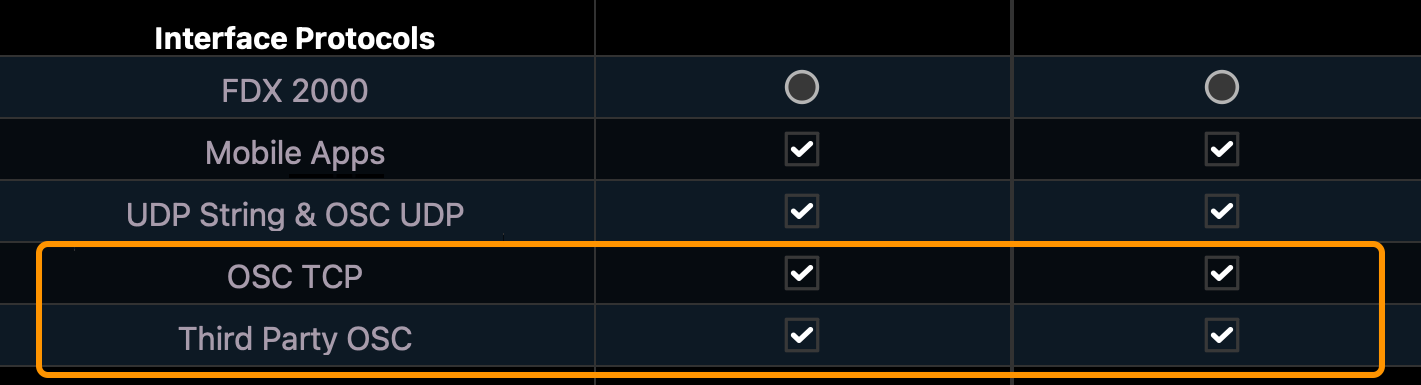
If you are using Eos 3.3.9 or higher, you do not need to follow the instructions below this point simply enter the point number 3038 in CueCam after selecting your Eos IP address.
Then within the System > Show Control set *OSC TX* to On, and ensure *OSC TCP Mode* is SLIP (v1.1). You should set a high port (greater than 1024) in *OSC TCP Server Ports* and remember this for later as you will need to provide it to CueCam.
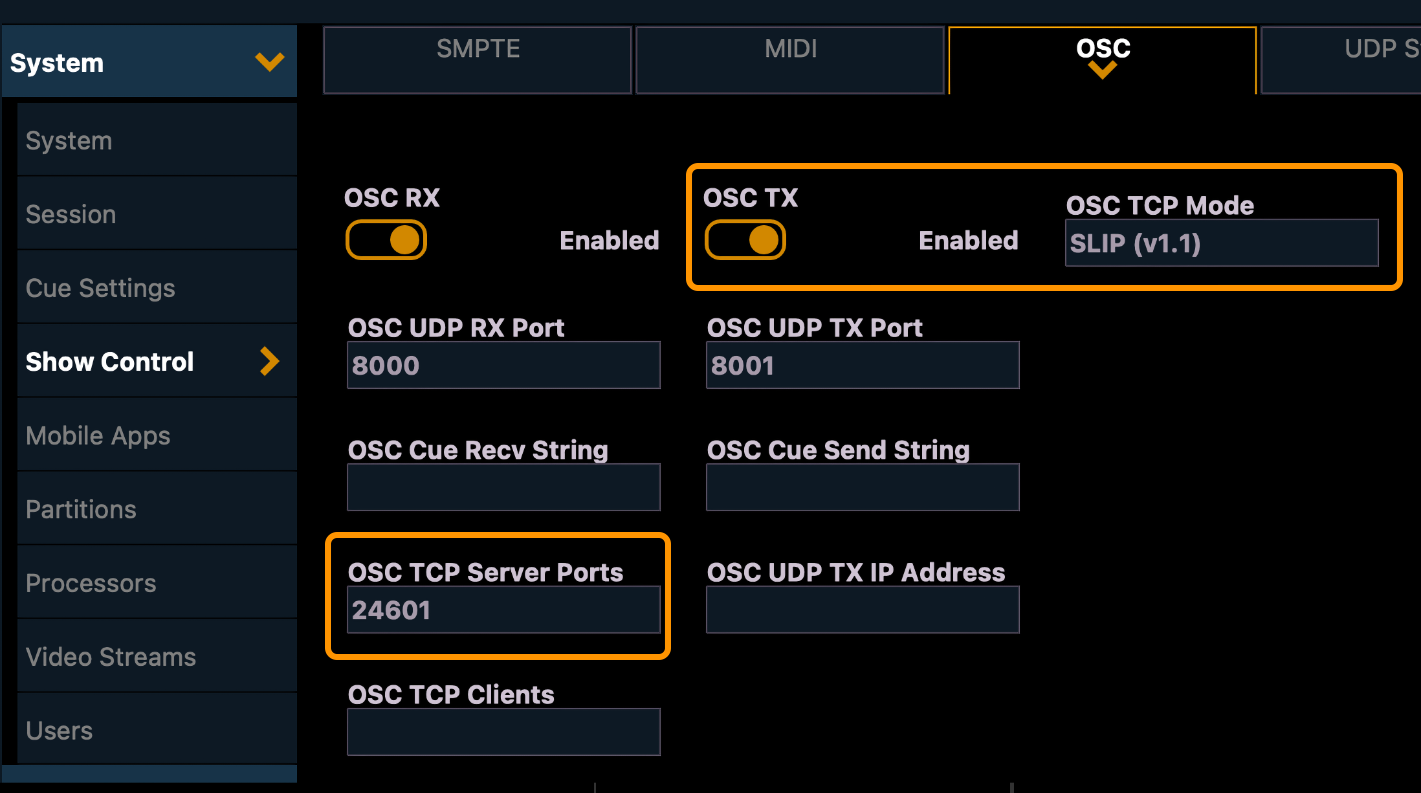
Due to a limitation in Eos prior to 3.3.9, remote commands to control CueCam cannot be sent over Third Party OSC, but must use the separate TCP connection. If you do not enable OSC TCP you will still get live cue information from Eos but control and markers won't work — This is reflected by the AMBER connection status dot in Settings.
EOS Version
EOS v3.3.9 or higher is recommended as there are significant improvements to OSC performance. Any console that can run EOS v3.2 (the previous recommendation) can also run EOS v3.3.9, so we recommend you upgrade.
If for any reason you cannot upgrade the console, CueCam performs best with EOS v3.2 or higher.
EOS v2.9 will work, but the refresh rate of cue data is much slower and you will probably need to enter the IP manually (auto-discovery may not work as expected). Ensure you follow the OSC Setup guide above.
EOS Show Control Messages
CueCam will send a number of Eos OSC Show Control Messages when actions are performed such as starting and stopping recordings, some users use these to trigger macros, channels, or recall specific snapshots to provide a visual indication of CueCam's current state as an alternative to the RTSP Streams
Supported Features and Limitations
Eos allows from some incredibly complicated cue sequences, and CueCam is designed as a simpler representation of your show.
The following data will be retrieved from your Eos console and displayed on CueCam recordings;
- For each selected Cue List;
- Current Cue Number
- Current Cue Label (also supports the Eos Label Symbols)
- Remaining Cue fade time (expressed in seconds)
- Completed percentage
- Current Scene
Current Limitations;
- Scene information is taken from Cue List 1
- When a new cue fires, only the most recently fired cue from that list is shown even if others are still running
- Individual times (focus, beam, colour, etc) are not shown separately
- If a Cue or Scene is renamed, it will not show the new name until it next fires.
- Parts are not shown individually, only the whole main cue number will appear..
- Playbacks other than the cue list (e.g. subs) will affect your stage output but are not shown in CueCam