Metadata
One of the best features of CueCam, in our opinion, is that you don't need any special software to collaborate. Anyone can view the files CueCam creates because they are simple video files with 'burned-in' information that you can easily scrub through.
However, we also embed some hidden metadata for use with CueCam Play and other third party applications that want to support it.
Sharing CueCam Videos
Dropbox
When uploading to Dropbox from within CueCam, the embedded data is preserved. This is the preferred method for sharing CueCam files.
AirDrop
Unfortunately, AirDrop sometimes strips metadata as it processes the video when sharing. To be sure to avoid this, you should select Options from the 'share sheet' that appears before selecting AirDrop and then ensure All Photos Data is selected
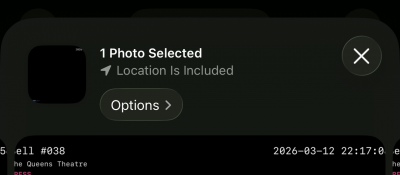
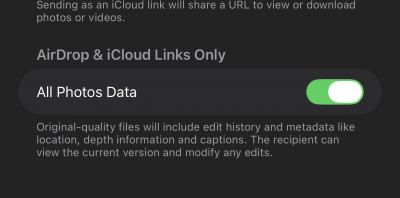
This has the unfortunate side-effect of transferring the file with a generic name like MOV00024.mov within a folder containing the CueCam file name, but it does preserve the metadata.
We're looking into improving this, but subject to limitations of the iPhone Operating System. Whatever we do in future versions it will remain backwards compatible!
From CueCam 1.30 we have implemented a workaround that means AirDrop files, even when missing the full metadata, can be navigated effectively in CueCam Play